


Basic or Pro Email templates. It's easy either way and you have total control to choose.
Whether you need a quick, ready-to-send email or a fully designed, branded experience, Nagging Panda gives you two options: Basic for speed, Pro for total customization. Works with both instant and scheduled workflows.
Why
Message
Templates Matter
Fast Setup for Busy Teams
Basic mode lets you create clean, professional messages in minutes.
Fully Branded for Maximum Impact
Pro mode turns your emails into mini-campaigns, complete with images, buttons, and banners — perfect for driving engagement and upsells.
Choose the Right Tool for the Job
Basic for when you want to keep it simple, Pro for when you want to impress.
How it works
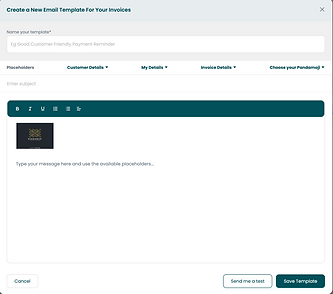
Basic Mode – Quick & Professional
-
Write like you would in an email, add your logo, and personalize with customer details. Perfect for payment reminders, quotes, and credit notes.
-
(Think: fast, no-frills, gets the job done.)
Pro Mode –
Drag, Drop & Design
Build advanced, visually rich emails using a simple drag-and-drop builder. Add banners, buttons, social links, and more — no design skills needed.
(Think: marketing-style emails that grab attention and sell while you collect.)
Personalised,
Automated Messaging
Dynamic fields ensure each follow-up feels like it was written just for them.
Works Across
Workflows
Use Basic or Pro for instant sends (first invoice or quote) and scheduled sends (follow-ups, statements, promotions).
Why businesses love it
Quick to Set Up
Templates can be ready in minutes.
Better Engagement
Pro templates boost clicks, and even sales.
One System, Two Approaches
Switch between Basic and Pro depending on the message.

.png)